Rizwan Haider
Introduction
I worked with a small marketing agency a while back that ran everything through email threads and a shared spreadsheet. It worked fine when there were three people. By the time they hit eight, tasks were falling through constantly.
That’s the exact turning point I’ve seen play out with different small businesses over the years. At nextsider.com, we cover this kind of practical SaaS decision often, because knowing when to make the switch matters just as much as which tool you pick.
Why Do Small Businesses Struggle Without Project Management Software?
Most small teams don’t plan to lose track of work, it just happens gradually as more tasks and people get added to the mix. The tools that worked early on stop scaling quietly in the background.
Common Signs You’ve Outgrown Spreadsheets and Email
- Tasks get mentioned in chat but never formally assigned
- Deadlines exist only in someone’s head or a calendar reminder
- Updates get repeated across multiple email threads
- No one has a clear view of what’s actually in progress
In my experience, the tipping point usually isn’t team size exactly, it’s the number of active projects running at once. A five-person team juggling one project is fine on spreadsheets. The same team juggling four projects usually isn’t.
The Real Cost of Disorganization
Missed deadlines are the obvious cost, but the hidden one is repeated work. I’ve seen teams redo tasks simply because nobody could confirm whether something was already done.
What Are the Core Benefits of Project Management Software?
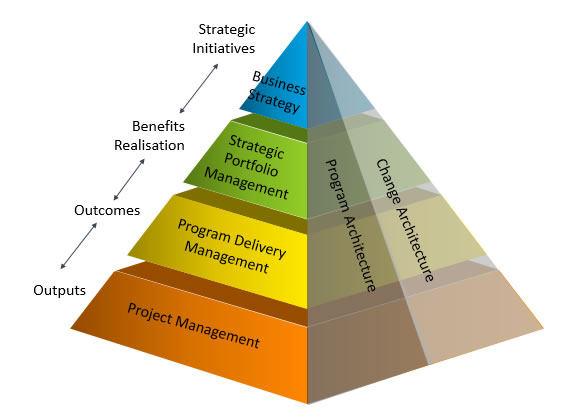
The right tool does more than just list tasks. It creates shared visibility that spreadsheets and email threads can’t match on their own.
Centralized Task Tracking
Every task lives in one place with a clear owner, deadline, and status. This alone eliminates most of the “wait, who’s handling this” conversations.
Better Team Accountability
When tasks are assigned and visible to the whole team, follow-up becomes much easier. Nobody can quietly let something slip without it showing up somewhere.
Improved Client and Stakeholder Communication
- Shared project boards give clients a clear view of progress
- Fewer status update emails are needed
- Deadlines and deliverables stay documented in one place
Pro Tip: When I help a small business choose their first PM tool, I always suggest starting with just one active project inside it before migrating everything at once. Trying to move five ongoing projects into a new system in one week almost always causes more chaos than it solves.
How Do You Choose the Right Project Management Software for a Small Business?
Not every tool fits every business, and picking based on popularity alone often backfires. The right choice depends on team size, budget, and how much structure the team actually needs.
Questions to Ask Before Choosing
- How many people need daily access to the tool?
- Does the team need simple task boards or more advanced features like time tracking?
- What’s the realistic monthly budget per user?
- Does it integrate with tools the team already uses, like Slack or Google Drive?
Free vs Paid Options
Many small businesses start on free tiers of tools like Trello, ClickUp, or Asana, which cover basic task tracking without any cost. Paid plans usually become worth it once the team needs automation, reporting, or more storage.
Project Management Software Comparison for Small Businesses
| Tool | Best For | Starting Price | Standout Feature |
|---|---|---|---|
| Trello | Simple task boards | Free tier available | Easy visual workflow |
| ClickUp | Growing teams wanting more features | Free tier, paid from ~$7/user/month | All-in-one flexibility |
| Asana | Cross-functional collaboration | Free tier, paid from ~$10.99/user/month | Workflow automation |
| Monday.com | Teams needing customization | Paid from ~$9/user/month | Visual customization |
Frequently Asked Questions
When should a small business start using project management software?
nce tasks start slipping through the cracks or the team is juggling more than one active project at a time, it’s usually time to switch.
Is project management software worth it for a team of 3 to 5 people?
It can be, especially free tiers, though very small teams sometimes manage fine with simpler tools until they grow.
What’s the cheapest way to start with project management software?
Free plans from tools like Trello or Click Up cover most basic needs without any upfront cost.
Do project management tools replace the need for team meetings?
No, they reduce the need for status update meetings but don’t eliminate the value of regular check-ins.
Can project management software help with client communication?
Yes, shared boards give clients visibility into progress without needing constant email updates.
What features matter most for a small business just starting out?
Simple task assignment, deadline tracking, and basic team visibility matter more early on than advanced reporting features.
Is it hard to switch from spreadsheets to project management software?
It takes some initial setup time, but starting with one project instead of migrating everything at once makes the transition smoother.
Conclusion
Project management software isn’t just for large teams. Once a small business starts juggling multiple projects or clients, the lack of a shared system tends to cost more time than the tool itself would.
We put this guide together on nextsider.com after seeing the same disorganization pattern play out across different small teams. If deadlines are starting to slip or updates keep getting lost in email, that’s usually the sign it’s time to make the switch.